

Data pipeline automation is the software-driven orchestration of ingestion, transformation, and delivery that turns scattered raw data into reliable, analytics-ready output with minimal human intervention. The payoff is consistency: pipelines that used to break at 2 a.m. or drift out of sync now run on schedule, retry themselves, and alert someone before a dashboard goes stale. Tools like Apache Kafka and Apache Airflow handle the plumbing; platforms like Vetros remove the plumbing altogether for teams that just need the dashboard.
TL;DR:
- Automated pipelines ensure data consistency, reliability, and faster insights, especially important as global data creation continues to grow rapidly.
- Choosing between batch, streaming, or hybrid patterns depends on actual latency needs, with most teams overestimating the necessity of streaming and incurring higher costs.
- Effective orchestration and monitoring require explicit dependency mapping, retries, schema validation, and metadata management to prevent common pipeline failures.
- Simplified, managed platforms like Vetros eliminate the need for engineering resources by automatically handling ingestion, modeling, and lineage, enabling non-technical teams to maintain reliable dashboards.
- Controlling costs involves prioritizing batch over streaming when possible, centralizing transformations, and using lineage metadata to limit reprocessing, which reduces compute and orchestration expenses.
Table of Contents
- What Is Data Pipeline Automation, Really?
- What Are the Core Components of an Automated Pipeline?
- What Business Outcomes Does Automation Actually Deliver?
- Batch, Streaming, or Hybrid: Which Pipeline Type Fits?
- Which Tools Handle Orchestration, Streaming, and Modeling?
- What Best Practices Keep Automated Pipelines From Breaking?
- How Do You Actually Automate an Existing Manual Pipeline?
- Why Vetros Cuts the Maintenance Load for Non-Technical Teams
- How Do You Secure an Automated Data Pipeline?
- What Drives the Cost of Running Automated Pipelines?
- How Do You Manage Data Quality Inside an Automated Pipeline?
- What Architectural Patterns Actually Scale?
- Priority Actions and Trade-Offs Worth Making Early
- A Faster Path to Live Dashboards Without the Pipeline Overhead
- Sources
- FAQ
What Is Data Pipeline Automation, Really?
Data pipeline automation is the practice of using software, rather than manual scripts or someone's Tuesday-morning routine, to move data from its source, reshape it, and deliver it somewhere useful. That scope covers more than moving files. It includes monitoring whether the move succeeded, tracking where the data came from, and enforcing rules about who can touch it along the way.
People often use "ETL," "ELT," and "pipeline automation" as if they're interchangeable. They're not:
- ETL (extract, transform, load) reshapes data before it lands in the warehouse, historically to save storage and compute.
- ELT (extract, load, transform) dumps raw data into the warehouse first and transforms it there, which is now the dominant pattern thanks to cheap cloud storage.
- Pipeline automation is the broader operating layer: it can run either pattern, but it also owns scheduling, retries, dependency logic, and failure handling.
That last distinction matters more than it sounds. A cron job that fires a script every night is "automated" in the loosest sense. It isn't pipeline automation until something watches for schema changes, retries failed loads, and logs lineage. Scheduling alone is a timer. Full pipeline control is a system.
What Are the Core Components of an Automated Pipeline?
Every automated pipeline breaks down into a handful of modular pieces, and skipping any one of them is usually where production incidents start.
- Ingestion pulls data in, whether through API connectors, change data capture (CDC) that streams row-level updates, or polling that checks a source on a timer. Event-driven ingestion tends to beat polling for freshness, but it costs more to build.
- Transformation reshapes raw data into usable models, typically through SQL, Python, or a transformation layer like dbt that adds testing and version control to what used to be a folder of ad hoc scripts.
- Storage and staging sit between raw and modeled data, whether that's a data lake for flexibility, a warehouse for structure, or a lakehouse trying to split the difference.
- Orchestration sequences everything through a Directed Acyclic Graph (DAG), the standard way orchestrators declare which tasks depend on which, and in what order they run.
- Monitoring, metadata, and governance track data lineage, enforce access rules, and catch anomalies before they hit a dashboard.
The scale problem behind all of this is real: global data creation continues to climb year over year, and manual pipeline maintenance simply doesn't scale at that rate. A team managing ten sources by hand can survive. A team managing two hundred can't, not without something automated doing the watching.
What Business Outcomes Does Automation Actually Deliver?
The case for automating a pipeline usually comes down to five measurable outcomes, and most teams underweight the last one until it bites them.
- Reliability. Automated retries and validation catch the failures a human would otherwise discover only after a stakeholder asks why the dashboard looks wrong.
- Speed to insight. Data lands and gets modeled within minutes of arrival instead of waiting for someone's morning batch job, and mean time to resolution (MTTR) on failures drops because alerts fire immediately instead of surfacing days later.
- Scale without proportional headcount. Adding a new data source shouldn't require adding a new engineer.
- Cleaner inputs for machine learning. Machine learning data pipelines are especially sensitive to silent schema drift or duplicate records, and automated quality gates catch those before they poison a training set.
- Less engineering toil. Time that used to go into babysitting jobs shifts to actually building things.
Worth tracking once automation is live: pipeline uptime, data freshness lag, failure rate per run, and the percentage of records rejected at quality gates. Those four numbers tell you faster than any dashboard whether the system is actually behaving.
Batch, Streaming, or Hybrid: Which Pipeline Type Fits?
Picking the wrong execution pattern is one of the more expensive mistakes teams make early, mostly because streaming feels more impressive than it needs to be for most workloads.
- Batch processing runs on a schedule, hourly, nightly, or weekly, and fits reporting, financial reconciliation, and anything where a few hours of latency is fine. It's the cheapest and simplest pattern to operate.
- Streaming processes events as they arrive, continuously, and fits real-time dashboards, fraud detection, and anything where a delay of minutes is a delay too long. It's also the most expensive and operationally demanding pattern.
- Micro-batch splits the difference, processing small batches every few minutes rather than continuously, and works well for near-real-time use cases like IoT sensor aggregation that don't need true streaming.
- Hybrid pipelines run batch and streaming side by side, often batch for historical reporting and streaming for live operational views of the same underlying data.
The trade-off is almost always latency versus cost versus complexity. Streaming buys you speed but demands more infrastructure and more careful failure handling. Batch buys you simplicity but means someone's decision is always based on data that's a few hours old. Most teams overestimate how much streaming they actually need.
Which Tools Handle Orchestration, Streaming, and Modeling?
The open-source stack that dominates data engineering discussions breaks down into distinct roles, and confusing them is a common early mistake.
- Apache Airflow handles orchestration: it schedules tasks, tracks dependencies as DAGs, and manages retries when something fails. Airflow's own task documentation is explicit that failure handling and retry logic need to be designed deliberately, not assumed.
- Apache Kafka handles streaming and messaging, acting as the publish/subscribe backbone that lets ingestion and downstream processing operate independently of each other.
- Apache Spark (specifically Spark Structured Streaming) and Apache Flink handle processing, doing the actual computation on data in motion, whether that's aggregating events or joining streams together.
- dbt handles transformation and modeling, bringing testing, documentation, and version control to SQL transformations that used to live in scattered scripts.
Teams evaluating orchestration and integration approaches generally land on one of two paths: code-first open-source stacks that give full control but demand ongoing maintenance, or managed platforms that trade some flexibility for far less operational overhead. Open-source components are genuinely powerful, but Airflow's own project maintainers are candid that running them at scale is a real operational commitment, not a one-time setup.
Pro Tip: Don't reach for Kafka and Flink because they're the tools everyone talks about. If your data updates hourly and nobody needs it faster, a scheduled batch job in Airflow will outperform a streaming stack you now have to keep alive.
What Best Practices Keep Automated Pipelines From Breaking?
Production incidents in automated pipelines tend to trace back to the same handful of missing safeguards, not exotic failures.
- Map dependencies explicitly. A DAG only protects you if every real dependency is represented in it; hidden dependencies are where cascading failures start.
- Build in retries, idempotency, and checkpointing. A task that can safely run twice without duplicating data is worth more than one that runs fast but breaks on a retry.
- Test schema contracts. Automated drift detection catches an upstream field rename before it silently nulls out a column downstream.
- Add data-quality gates with quarantine handling. Modern automated pipelines increasingly embed quality checks and self-healing behavior, routing bad records to a holding area instead of letting them flow through.
- Monitor for real, not cosmetic, signals. Track freshness, volume anomalies, and failure rates, and set actual SLAs, not vague uptime hopes.
- Version control transformation code and deploy through CI/CD. Pipeline logic changes should go through the same review discipline as application code.
Metadata deserves more respect than most teams give it. Treated as an active signal rather than a static log, lineage data can drive selective reprocessing, rerunning only the parts of a pipeline actually affected by an upstream change instead of the whole thing.
How Do You Actually Automate an Existing Manual Pipeline?
Turning a manual process into an automated one goes smoother when it's treated as a sequence, not a weekend project.
- Inventory everything. List every source, every transformation step, and every downstream consumer, then sketch the dependency map. You can't automate what you haven't mapped.
- Choose your pattern and stack. Decide batch, streaming, or hybrid based on actual latency needs, then pick orchestration and processing tools that match.
- Build ingestion with tests. Implement connectors or CDC, and write schema contract tests before the pipeline ever touches production data.
- Deploy with monitoring built in. Set up CI/CD for pipeline code, define SLAs, write runbooks for common failures, and wire up alerting before launch, not after the first incident.
- Pilot on one contained flow first. Run it, watch the metrics, fix what breaks, and only then expand to the rest of the pipeline inventory.
Pro Tip: Pick your pilot flow based on blast radius, not convenience. A contained but genuinely important dataset forces you to prove retries and SLA monitoring actually work before you bet the whole warehouse on them.
Why Vetros Cuts the Maintenance Load for Non-Technical Teams
Most of what's described above (DAGs, CDC connectors, schema contracts) assumes a team with engineers to build and maintain it. Vetros skips that requirement. Describe the dashboard you want, and Vetros connects to your data sources, handles ingestion and modeling automatically, and keeps the result live. Small businesses, startups, and analysts without a data engineering function get the traceable lineage and privacy controls of a real pipeline, minus the DAG maintenance.
How Do You Secure an Automated Data Pipeline?
Automation multiplies the number of places data flows through, and each connection point is a potential exposure if it's not locked down deliberately.
Encrypt data both in transit and at rest, especially anywhere a connector is pulling from a third-party API or a customer-facing system. Apply role-based access control at every stage, not just at the final warehouse. It's common to see teams lock down a data warehouse tightly while leaving a staging bucket wide open, which defeats the point.
Credential management deserves particular attention in automated systems, since connectors and orchestrators often need standing access to sensitive sources. Rotate API keys and database credentials on a schedule, store them in a secrets manager rather than in pipeline code or configuration files, and audit which services actually still need the access they were granted months ago.
Log everything that touches personally identifiable information, and make sure that log is itself access-controlled. Lineage tracking, useful for debugging, is equally useful for proving compliance during an audit, since it shows exactly where a piece of data traveled and who transformed it.
Finally, treat pipeline failures as a security surface, not just a reliability one. A quarantine queue full of malformed records sitting in an unencrypted bucket is its own liability. Apply the same encryption and access rules to error handling and dead-letter queues that you apply to the primary data path. It's an easy thing to overlook because quarantine data feels temporary, but temporary data still needs protection.
What Drives the Cost of Running Automated Pipelines?
Compute and storage are the obvious cost centers, but the bill that actually surprises teams usually comes from data movement and orchestration overhead they didn't budget for.
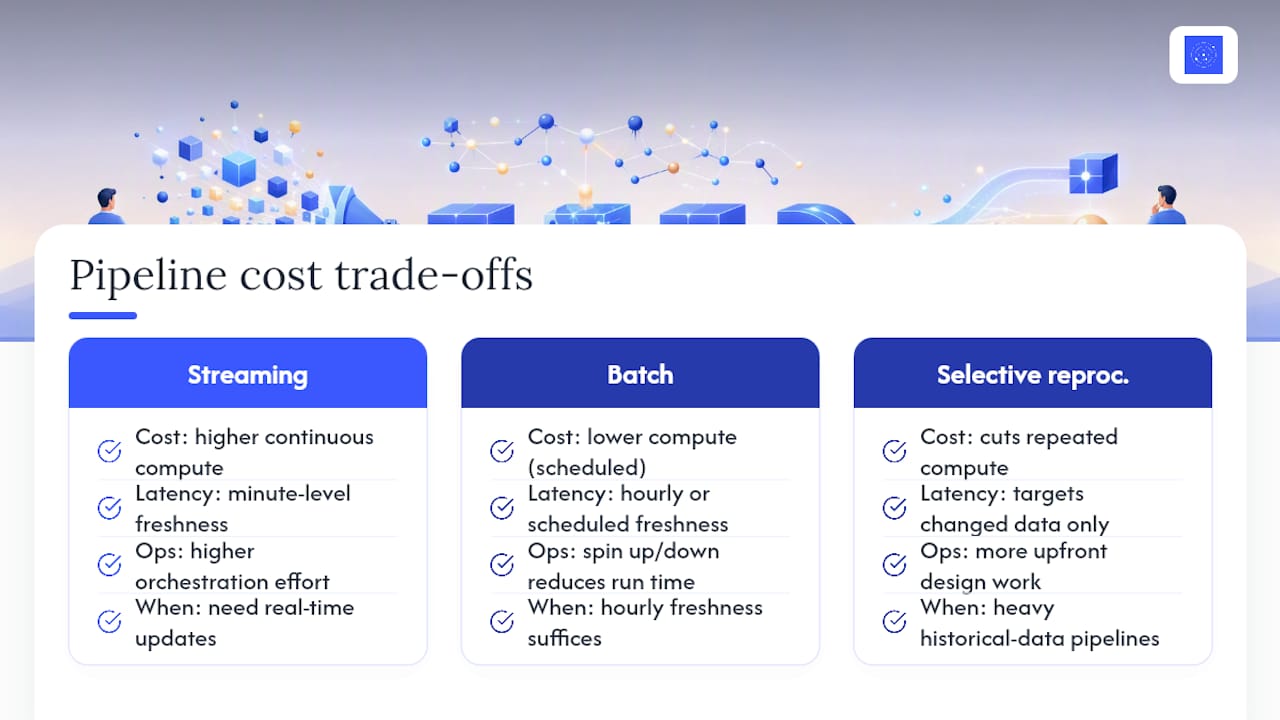
Streaming pipelines cost more to run continuously than batch pipelines that spin up on a schedule and shut down when finished. That's the latency versus cost trade-off from earlier showing up directly on an invoice. Before defaulting to streaming, check whether the business actually needs minute-level freshness or whether hourly batches would serve just as well at a fraction of the compute cost.
Redundant transformations are a quieter cost leak. Teams that let multiple pipelines independently recompute the same aggregation, rather than centralizing it once in a shared model, end up paying compute costs multiple times over for the same answer. A well-modeled transformation layer, the kind dbt is built to encourage, tends to collapse a lot of that duplication.
Orchestration tools themselves carry cost beyond their license or hosting fee. Open-source stacks like Airflow are free to download but require engineering time to run, patch, and scale, and that time has a real cost even if it never shows up on a software invoice. Managed platforms shift that cost into a predictable subscription, which is often cheaper in total once engineering hours are counted honestly.
Selective reprocessing, using lineage metadata to rerun only what changed instead of full pipeline refreshes, is one of the more underused cost levers available. It requires more upfront design work, but it can cut both compute spend and runtime substantially on pipelines with heavy historical data.
How Do You Manage Data Quality Inside an Automated Pipeline?
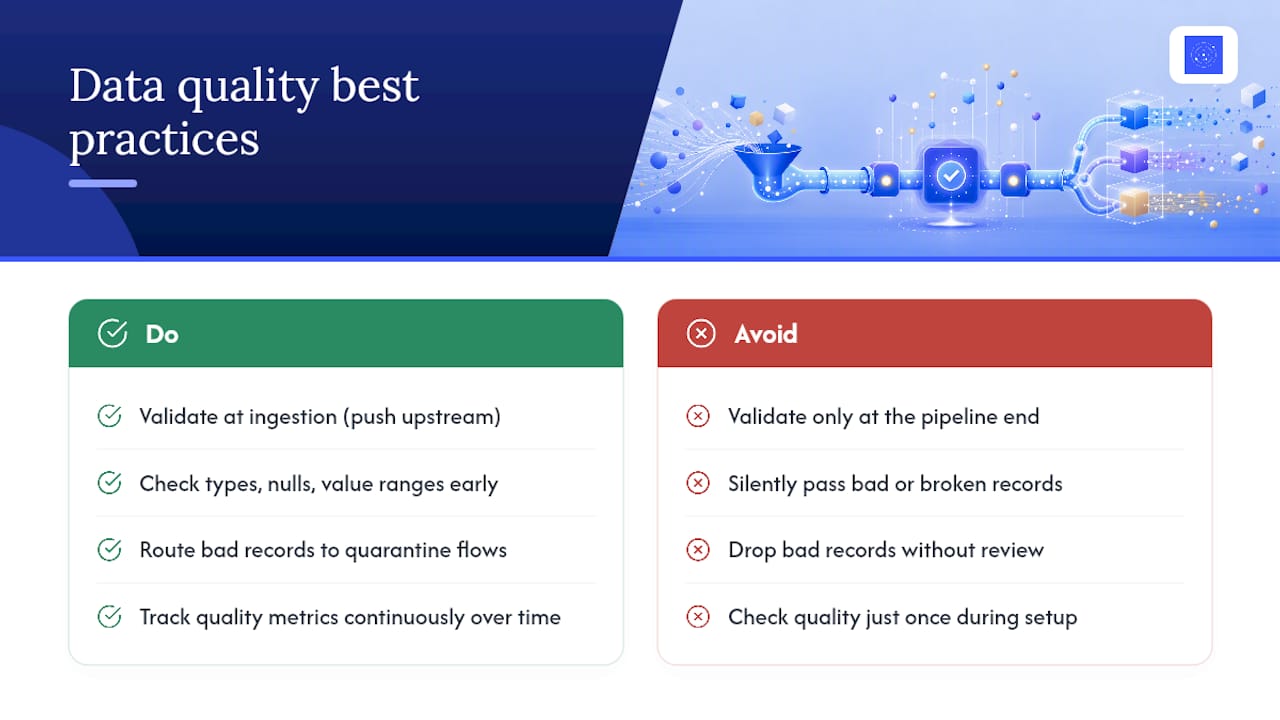
Quality checks that live only at the end of a pipeline, right before a dashboard, catch problems too late to prevent bad decisions from being made on bad data in the meantime.
Push validation as far upstream as possible. Check data types, null rates, and value ranges at ingestion, not just after transformation, so a broken source gets flagged before it propagates through every downstream model. Automated pipelines built for production reliability increasingly treat quarantine flows as a first-class feature: a bad record doesn't just get dropped or, worse, silently passed through. It gets routed aside for review while everything else keeps moving.
Schema contracts are a quality tool as much as an engineering one. Defining an expected schema and testing incoming data against it catches drift, a renamed field, a changed data type, a dropped column, before it turns into a null-filled report that nobody notices until a stakeholder asks a pointed question.
Anomaly detection on volume and distribution matters more than most teams realize. A source that normally delivers ten thousand rows a day and suddenly delivers forty is worth flagging even if every row individually looks valid. That kind of shift often signals a broken upstream job long before anyone downstream would catch it manually.
Finally, treat data quality metrics as something to monitor continuously, not check once during setup. Track rejection rates at each quality gate over time. A creeping rejection rate is an early warning that something in the source system changed gradually, the kind of drift that's invisible in any single day's data but obvious across a month.
What Architectural Patterns Actually Scale?
The pattern that scales best is rarely the most sophisticated one. It's the one that separates concerns cleanly enough that any single piece can be replaced without rebuilding the rest.
Decoupling ingestion from processing through a messaging layer, the role Kafka plays, means a slow or failing downstream process doesn't block new data from arriving. That separation alone prevents a huge share of cascading failures in tightly coupled systems where one broken transformation can back up an entire pipeline.
Layered storage, raw data in one place, cleaned and modeled data in another, is another pattern worth defaulting to. It lets you reprocess from raw data when a transformation bug is discovered, instead of having already overwritten the only copy of the source data with a flawed calculation.
Modular, testable transformations, the approach dbt popularized, scale better than long monolithic scripts because a failure in one model doesn't require debugging the entire pipeline to isolate. Each transformation can be tested, versioned, and rerun independently.
For teams evaluating build versus buy at the architecture level, business use cases around data activation tend to clarify the decision faster than a pure technology comparison does: the question isn't which stack is most capable, but which one matches how fast the business actually needs to move.
Priority Actions and Trade-Offs Worth Making Early
If a team asks where to start, the answer is always the same: inventory first, define SLAs second, pilot small third. Skipping straight to tooling decisions before mapping dependencies is how projects stall six months in with half-built DAGs nobody trusts.
The code-first versus managed decision usually comes down to whether the team has engineering hours to spare, not whether Airflow is technically superior. And on latency versus cost, most businesses don't need streaming nearly as often as they assume. Start with the cheapest pattern that meets the actual SLA, not the one that sounds most impressive in a planning meeting.
— Ąžuolas
A Faster Path to Live Dashboards Without the Pipeline Overhead
Everything covered above, DAGs, retries, schema contracts, CI/CD, is real work, and it's the right investment for teams with engineering hours to spend on it. But plenty of businesses don't have that capacity, and don't need a full data engineering function just to see accurate, current numbers. Some platforms serve that gap: describe the dashboard you want, and they handle the ingestion, modeling, and maintenance behind it, with code you can read and modify and lineage you can trace.
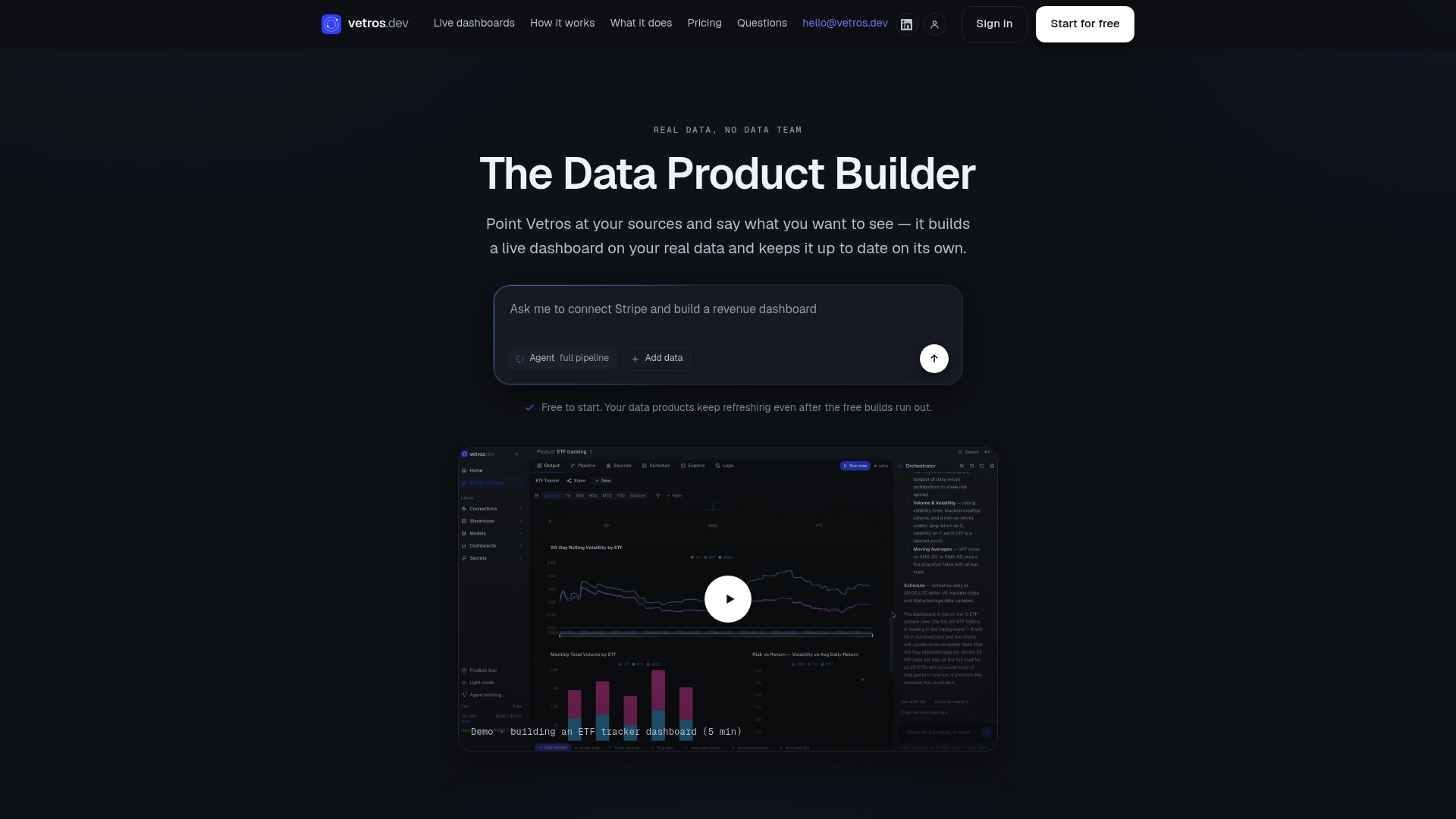
If your team is choosing between hiring a data engineer and just getting the dashboard working, start a trial and connect a real data source to see how it behaves against your own numbers. For organizations already running Airflow and Kafka at scale with dedicated engineering support, that code-first stack still makes sense. For everyone else, Vetros gets you to a live, trustworthy dashboard without standing up the infrastructure first.
Sources
- What Is Data Pipeline Automation? | IBM
- Data Pipeline Automation Best Practices | Pantomath
- Apache Kafka
- Amount of data created worldwide — Statista
FAQ
Is a Data Pipeline the Same Thing as ETL?
No. ETL is one specific pattern (extract, transform, load) for moving and reshaping data, while a data pipeline is the broader system that can run ETL, ELT, or streaming patterns and also handles orchestration, monitoring, and governance.
Will AI Replace ETL Engineers?
AI is automating more of the repetitive work inside ETL, like schema mapping and anomaly detection, but someone still needs to define SLAs, design dependency maps, and handle edge cases, so the role is shifting rather than disappearing.
How Do You Automate an Existing ETL Pipeline?
Start by inventorying sources, transformations, and consumers, then implement connectors with schema tests, deploy through CI/CD with monitoring and defined SLAs, and pilot on one contained data flow before scaling to the rest.
Can AI Actually Build Data Pipelines?
AI can generate connector code, suggest transformations, and flag anomalies, and platforms like Vetros use this to let non-technical teams describe a dashboard in plain language and get an automatically built, live pipeline behind it without writing DAGs by hand.